


In this article
Have you reached the limit for email messages, article creation, private messages, or another Amwaly feature? Increase Feature Limits with Points lets you buy extra units from your existing points wallet without creating a new membership or changing your current plan.
This guide explains how the system works, how base limits differ from extra units, how to buy a pack, what membership values mean, what happens when a membership ends or the points balance is insufficient, and how Amwaly protects purchases, usage, reservations, refunds, and administrative adjustments.
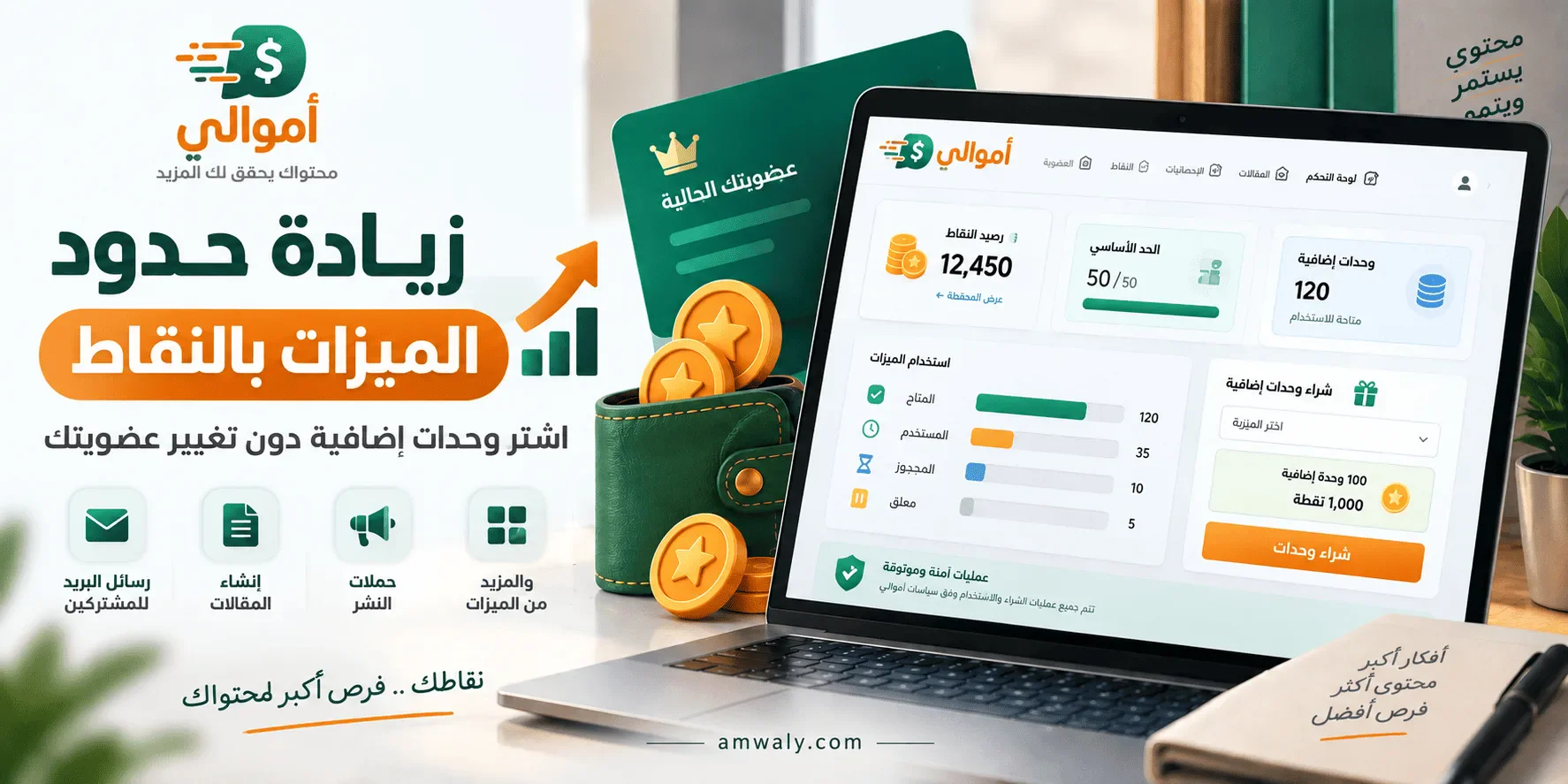
What does increasing feature limits with points mean?
Every Amwaly membership can include features with usage limits. A limit may represent email campaign messages, new articles, private messages, direct publishing actions, banner campaign publishing, or the number of private blogs an account can create.
When the base allowance is used, an administrator may enable extra-unit offers funded by points. Each offer defines:
- The feature that receives the units.
- The number of points charged for each pack.
- The number of units added by each pack.
- The maximum number of packs allowed in one purchase.
- Whether the units depend on an eligible membership or may be used independently.
Prices, point ratios, pack sizes, and limits are configured by the administrator. There is no universal price or fixed number that applies to every plan or account.
Does this create a new membership or wallet?
No. The system reuses Amwaly’s existing points wallet, membership plans, and feature limits. A purchase receives its own unit-ledger record so you can see what was bought, consumed, reserved, or left available, while remaining tied to your account and the selected feature.
Buying email-message units does not create a new email membership. Buying article units does not grant publishing rights, earnings, or any other membership permission. Extra units apply only to the feature named in the offer.
Which features can support extra units?
Extra units are available only for features enabled and configured by the administrator. Examples include:
- Email campaign messages for subscribers.
- Public article creation.
- Private-blog article creation.
- Direct publishing.
- Direct publishing inside private blogs.
- Direct banner campaign publishing.
- Private messages.
- Private-blog capacity.
Not every numeric or percentage value in a membership automatically becomes a purchasable unit. The offer must be enabled and connected to a supported feature in the administration panel.
What do N, 0, a number, and Y mean?
The membership feature value has a specific meaning:
| Value | Meaning |
|---|---|
| N or 0 | The base feature is disabled for the membership. |
| A number | The number of base units allowed during the configured period. |
| Y | The base allowance is unlimited, subject to account and platform policies. |
If the feature is set to N or 0, buying extra units does not automatically unlock it. The result depends on the offer’s Allow Standalone Purchase setting.
Which periods can be used for a limit?
The system uses the periods already supported by membership plans, including:
- One day or a daily period.
- Seven days, which is the configurable weekly period.
- One month or a monthly period.
- One year or a yearly period.
The period may differ between features and plans. Your dashboard shows the available balance and renewal time, so you do not need to guess which period applies.
Base allowance versus extra units
The base allowance comes from your membership and resets according to its configured period. Extra units come from a points purchase or an administrative grant linked to the selected feature.
Amwaly consumes the base allowance first. After it is exhausted, the system uses available extra units when the offer rules allow it. The dashboard keeps both sources visible so you can tell what came from the membership and what came from points.
Extra purchased units do not reset merely because a new membership cycle begins. Renewal recalculates the base allowance; purchased units remain until consumed or revoked under the applicable rules.
What does Allow Standalone Purchase mean?
This setting determines whether extra units can work when the base feature is disabled in your membership.
When standalone purchase is disabled
- You cannot use a dependent offer to unlock a disabled feature unless the policy allows it.
- Existing dependent units are preserved rather than deleted.
- The units may appear as suspended until membership eligibility returns.
When standalone purchase is enabled
- The offer may work for that feature without a base allowance, subject to account rules.
- The units grant no other membership permissions.
- Email units do not unlock publishing, and article units do not unlock private messages.
Do extra units expire when a membership ends?
Purchased units are not automatically deleted when a membership expires or renews. There are two important cases:
- Standalone units: may continue to work under the offer policy even when the membership changes, while normal account and security rules still apply.
- Membership-dependent units: remain in the account but may be suspended while no eligible membership is active. They become usable again when eligibility returns.
Membership expiry does not delete existing articles or private blogs, and units are never converted into unrelated permissions.
How does private-blog capacity work?
Private-blog capacity is different from an article-creation limit. It represents available slots for existing private blogs, not a recurring number of articles.
- Each existing private blog occupies one slot.
- Creating a new blog requires an available slot.
- Deleting a blog frees its slot.
- Renewing a membership does not delete your blogs.
- The system does not remove a slot that is needed by an existing blog.
Buying capacity units therefore increases the number of private blogs you can keep. It does not add articles inside a blog or grant independent publishing rights.
How to buy a unit pack
- Open Increase Feature Limits with Points from your dashboard.
- Select the feature you want to extend.
- Review the base allowance, available, used, reserved, suspended, and renewal details.
- Select a number of packs within the allowed maximum.
- Review the units added, points charged, and expected balance.
- Confirm the purchase after reading the offer terms.
The system creates a short-lived purchase quote. The current quote validity is ten minutes. Opening the page or viewing the quote does not debit points; the debit happens only after confirmation and a fresh balance and offer check.
What if the offer changes before confirmation?
At confirmation time, Amwaly rechecks the price, unit count, offer status, and points balance. If the quote expired or the offer changed, the old confirmation is rejected and you must create a new quote.
The system never uses an expired price or debits points from a changed offer.
What happens when the points balance is insufficient?
The entire purchase is rejected with a visible message beside the purchase action and inside the page. No points are debited, no units are added, and there is no partial purchase.
You can then reduce the number of packs, add points through an available method, request an administrative review when appropriate, and create a new quote after the balance is updated.
Can a double click charge points twice?
No. Every purchase uses a unique confirmation key and an idempotency constraint inside the transaction. Repeating the same request after success returns the existing purchase instead of creating a second debit.
Changing the purchase details while reusing the same key is rejected as a conflict and requires a new quote.
How are points and units synchronized?
The points debit, wallet ledger entry, and unit-ledger record are committed in one transaction. If one part fails, the system does not commit the other part on its own.
The resulting record includes the selected feature, pack and unit quantities, points paid, balance before and after, source and time, and units that are available, used, reserved, or suspended.
What happens when a unit is used?
When an operation needs a unit, the service reserves it so another operation cannot consume the same unit at the same time. After the operation succeeds, the reservation becomes consumed. If the operation is rejected, fails, or stops before execution, the reservation is released according to its result.
This is especially important for email campaigns and queued operations: a retry does not subtract the same unit twice, and concurrent requests cannot consume one unit twice.
What happens during concurrent usage?
The service locks the account, balance, and required unit lots, then checks the current balance again before committing. If no unit remains, the second operation receives a clear rejection or a safe retry result.
This prevents overspending and double consumption when multiple browser tabs or near-simultaneous requests are active.
Can points be refunded?
A unit purchase may be refundable while its units are unused and unreserved, subject to the refund action’s permission and the offer rules.
A full refund is rejected when units were consumed, units are reserved for an active operation, the purchase supports capacity already occupied by existing blogs, or the operation is still under review. These rules prevent a refunded balance from coexisting with real usage or occupied capacity.
Can an administrator add points or units?
Yes, authorized administrators can use separate adjustment actions. Adding points uses the existing points wallet and point log. Adding units creates an audited grant tied to the selected feature.
Every adjustment requires a reason and records the account, administrator, balance type, direction, quantity before and after, reason, operation key, and time. An adjustment does not start an email campaign or create a commercial purchase automatically.
Can an administrator remove balance?
An authorized administrator may remove points or units only within the matching permission. The system rejects removing more points than available, units already consumed, units reserved by a running operation, or capacity units required by existing private blogs.
Adjustment records are immutable from the interface so the reason and history remain reviewable.
Where can I see my balance and history?
Open Increase Feature Limits with Points and select a feature. The page normally shows:
- Base allowance.
- Available extra units.
- Used units.
- Reserved units.
- Units suspended because of membership eligibility.
- Points balance.
- Renewal time.
- Available offers.
- Purchase history.
If a feature or offer is missing, it usually means the administrator has not enabled it for your membership or the account does not meet its conditions.
Practical examples
Base allowance plus extra units
Your membership provides a base allowance. Amwaly consumes it first and then uses eligible purchased units. The dashboard keeps both sources separate.
A feature set to N
If the feature is N and standalone purchase is disabled, extra units do not unlock it. Dependent units remain preserved until eligibility returns.
Insufficient points
If a pack costs more points than your current balance, the purchase is rejected completely. You receive neither a debit nor a partial number of units.
Two confirmation clicks
The idempotency key prevents a repeated confirmation from creating a second charge. The account receives one purchase rather than two.
A reserved unit
When a unit is reserved for an active message or operation, another request cannot use it until the first operation finishes and the unit becomes consumed or released.
Private-blog capacity
Capacity units add private-blog slots. They do not add articles inside each blog and do not grant independent publishing rights.
Best practices
- Check the feature name before buying; email units cannot replace article units.
- Read the pack cost and unit quantity in the quote before confirming.
- Do not rely on an old price or pack size; offers are controlled by the administration panel.
- Keep enough points for important operations instead of always buying the maximum.
- Review reserved units before retrying an operation.
- Avoid sending multiple purchase requests at the same time when the balance is limited.
- After membership expiry, check whether units are suspended instead of assuming they were deleted.
- Keep the operation number when contacting support.
Frequently asked questions
Does increasing a limit with points replace a membership?
No. Extra units extend one selected feature and do not grant every membership feature or permission.
Can I set the pack price myself?
No. The administrator defines the price and unit quantity in the offer settings.
Can I buy units for a feature missing from my membership?
It depends on Allow Standalone Purchase. If it is disabled, the units do not unlock the disabled feature.
Do units expire at the end of the month?
They do not automatically expire just because a new cycle starts. Dependent units may be suspended if the membership is no longer eligible.
Can I use units from one feature for another feature?
No. Every unit is tied to a specific feature and cannot be transferred to another one.
Does consuming a unit always mean the operation succeeded?
The unit is consumed when the operation reaches its accepted result. A reservation alone is not final and may be released after rejection or failure.
What should I do if points were debited but units are missing?
Do not buy again immediately. Refresh the page, review the points and unit ledgers, and contact support with the operation number if the balances still do not match.
What should I do if the offer has expired?
Create a new quote. Do not reuse an old purchase page because the price or unit count may have changed.
Does deleting a private blog refund the capacity purchase?
Deleting a blog frees the occupied slot according to the account state, but it does not automatically convert the purchase into refunded points.
Can an administrator edit an old adjustment record?
No. The adjustment log is designed for review and keeps who performed the action, why it was performed, and the before-and-after values.
When should I contact support?
Contact support if points were debited without a clear purchase, a reservation remains after an operation ended, units stay suspended after eligibility returns, or a refund was rejected and needs review.
Conclusion
Increasing feature limits with points gives you more flexibility without creating a new membership. The system uses the existing wallet and membership rules, consumes the base allowance before extra units, protects balances through reservations and locking, shows a quote before charging, and keeps a clear history of purchases, usage, and adjustments.
Choose the right feature, review the offer and balance, and confirm only after checking that the units fit your needs. If you have a special case such as an expired membership, suspended balance, or incomplete operation, include the operation number when contacting support.
For more answers, visit Amwaly Support. Eligible users can open Increase Feature Limits with Points from their dashboard to review offers and balances.
Keep up with Ahmed Adel
Choose site notifications, email, or both. Guests can subscribe by email without an account.
Report this article
Tell our review team about a problem with this content. Your details will not be shown to the author or other readers.
Your report could not be sent. Please try again later.
Sign in to report an article





Discussion
comments (0)
Share a perspective. Start a thoughtful conversation.
please login to be able to comment